Etsy print on demand made simple
Connect your Etsy shop to JetPrint's own factory and start selling Etsy print on demand products without holding inventory or running a factory yourself.

Connect your Etsy shop to JetPrint's own factory and start selling Etsy print on demand products without holding inventory or running a factory yourself.
Etsy rewards products a shopper cannot find anywhere else, which is exactly what selling Etsy print on demand items offers: design a product once, list it in your shop, and JetPrint's own factory produces and ships each order only after a customer buys it, so nothing sits in a warehouse first.
Etsy is a global marketplace built around unique and creative items rather than mass-produced goods, which puts it in the same league as Amazon for buyer traffic while keeping search tuned to one-of-a-kind products. That mix suits a print on demand catalog well: Etsy's stated mission is helping small businesses reach shoppers looking for something special, so a shop selling personalized print on demand gifts or one-off designs is competing on the platform's own terms rather than against it.
JetPrint's app reviews, gathered across every store integration, are public on the Shopify App Store, the same reviews an Etsy seller can check before connecting a shop.
Etsy's marketplace already has millions of active shoppers searching for unique items, so a new listing gets found without buying traffic the way a standalone store often has to.
Etsy positions itself around independent sellers rather than big-box retailers, and its search behavior favors the kind of one-of-a-kind print on demand design mass retailers do not stock.
Listing an item costs about $0.20, so testing ten new print on demand designs on Etsy costs a couple of dollars, not a marketing budget.
Etsy Payments processes and secures checkout, so you are not setting up or maintaining a separate payment gateway to start selling.
Yes. Etsy requires shops that use a manufacturer to name that manufacturer under Production partners in shop settings, and JetPrint counts as one the moment your first product goes into production. Adding JetPrint takes under a minute and keeps an Etsy print on demand shop fully compliant with Etsy's manufacturing disclosure rules.
The disclosure only needs a manufacturer's name and location, not order volumes or pricing, and it becomes visible on your shop's About page so buyers can see how an item is made. Etsy does not penalize shops for disclosing a production partner: the rule exists so buyers can tell handmade listings from manufactured ones, and a seller running any of JetPrint's other store integrations meets the same requirement wherever a platform asks for it.
Every product you publish in JetPrint pushes to your Etsy shop as a new listing within minutes, and stock status stays current automatically. When a listing sells, the order routes back into JetPrint for production, and a tracking number syncs to Etsy the moment your package ships, with no manual entry.
Multiple Etsy shops can run from the same JetPrint account, each syncing independently, so testing designs across two or three shops does not mean duplicating setup work. If a published item is not showing up yet, the most common cause is a short API delay rather than a failed connection, so give it a few minutes before republishing anything.
Connecting Etsy to JetPrint takes four steps: open your account, connect and disclose your Etsy shop, publish a product, then let orders and tracking sync automatically from then on.
Sign up or log in, then open Dashboard and choose General store in the top right corner to start adding a shop, the same account that runs your other store integrations if you sell elsewhere too.
Click Add store, choose Etsy, and grant access from Etsy's authorization screen. Etsy requires shops that manufacture through a third party to name that manufacturer under Production partners in shop settings, so add JetPrint there once the connection is live.
Pick from JetPrint's 650+ products, design each one in the Mockup Generator, and publish. Listings and stock status push to your Etsy shop automatically and stay in sync as you add or edit designs.
When a customer buys on Etsy, the order routes into JetPrint for production in our own factory, and a tracking number syncs back to Etsy the moment it ships, the same fulfillment process used across every JetPrint integration.
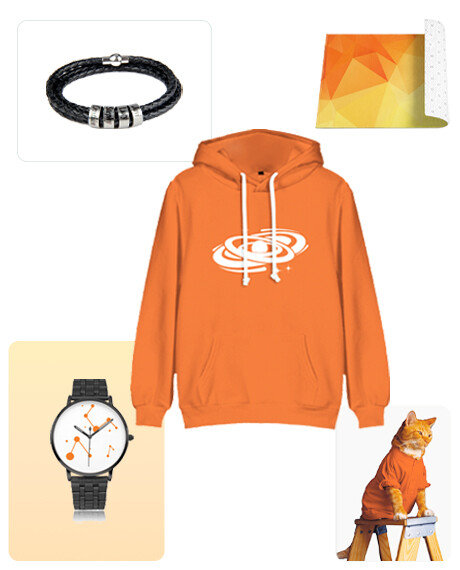
JetPrint runs its own factory rather than routing orders through a network of print partners, which lets Etsy sellers list categories a generic print on demand catalog rarely carries: embroidered custom embroidery, printed watches, and custom shoes with logo. There is no minimum order on any product, so a single Etsy sale is enough to trigger production, and every package can ship under your own branding instead of JetPrint's.
Etsy sellers pick from JetPrint's 650+ products in the Mockup Generator, including the print on demand shoes catalog, without a separate design tool subscription. For a full side-by-side against print partner networks, see our Printful alternatives comparison, and check setup notes for Shopify, WooCommerce or Wix if you sell on more than one platform.
As many as you like. Connecting Etsy, Shopify, WooCommerce or Wix to JetPrint is free with no monthly fee, and a single JetPrint account can run several Etsy shops at once, each syncing orders and tracking independently.
Most orders ship from JetPrint's own factory in China. Set your Etsy shipping profiles and processing times to match that origin, and contact support if a specific destination needs a different estimate.
No, as long as it is disclosed. Etsy allows manufactured listings when the shop names its production partner in settings; the policy exists for transparency, not to stop sellers from using a factory like JetPrint.
Yes, once your first JetPrint-made item goes live. Add JetPrint's name and factory location under Production partners in Shop settings; the disclosure takes under a minute and keeps your shop compliant.
JetPrint connects through Etsy's official API and only requests the store-management permissions shown on Etsy's own authorization screen before you approve the connection, the same permission model any other Etsy app uses.
Usually a short API delay: give it a few minutes and confirm the shop you are viewing is connected as an Etsy store, since a JetPrint account can also be linked to Shopify, WooCommerce or Wix stores at the same time.
Free to start. Connects to Etsy in minutes, with no minimum order and no monthly integration fee.
Start free